Create a separate user account for every employee who requires access to
PlaceFull. The user account identifies the employee's role and access permissions
within PlaceFull.
|
1.
|
Go to your PlaceFull online booking dashboard. |
|
2.
|
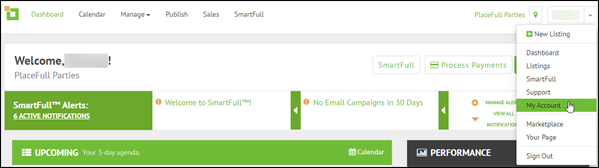
Click the drop-down arrow in the top right corner and select
My Account.
|
|
5.
|
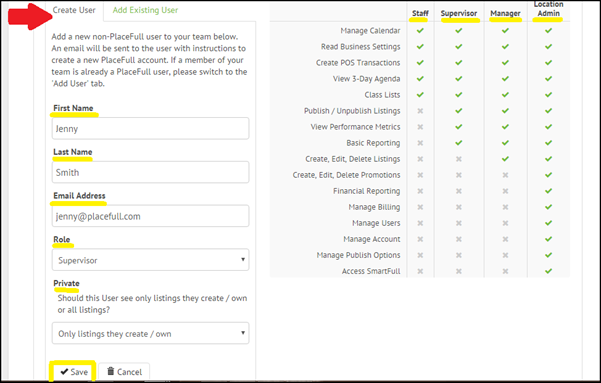
On the Create User tab, enter the employee's
First Name, Last Name, and
Email Address.
|
|
7.
|
Use the Private option to control whether the
employee can only see the listings that they create, or if they
can see all listings created by all employees.
|
The employee will receive an email asking them to activate their account
and set their password. Once they have activated their account they can log
into PlaceFull and perform tasks based on their role.

Comments
0 comments
Please sign in to leave a comment.