The billing email address is the one you use to receive messages regarding
billing (such as refunds, cancellations, and deposits). You should set up
at least one billing email address. There are two ways to set up the billing
email address:
-
Select a PlaceFull user account. The selected user(s)
will receive messages regarding billing. It is a good practice to
select more than one user, so the business can continue to receive
billing emails if one or more of the users is not working.
-
Enter an alternate billing email address. This email
address does not have to be connected to a PlaceFull user account.
For example, your store may have a generic billing@yourstore.com
email address that you use for all billing inquiries.
|
1.
|
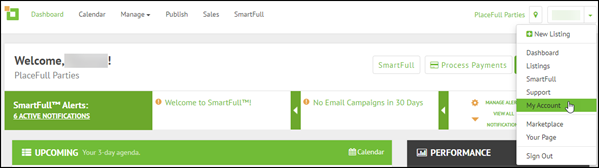
Click the drop-down arrow in the top right corner and select
My Account.
|
|
3.
|
(Optional) Select a PlaceFull user account: |
|
a.
|
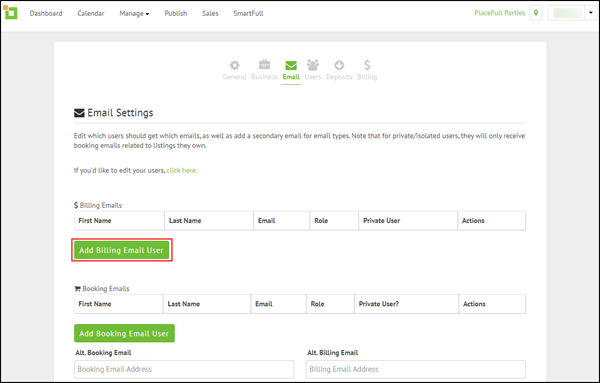
Click Add Billing Email User.
|
|
b.
|
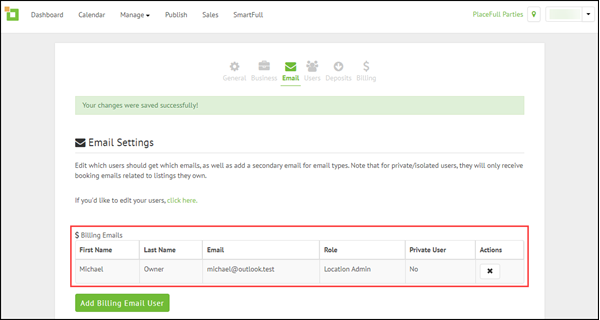
Click the drop-down list and select the user account that you
want to use to receive emails about billing.
|

|
4.
|
(Optional) Enter an alternate billing email address: |
|
a.
|
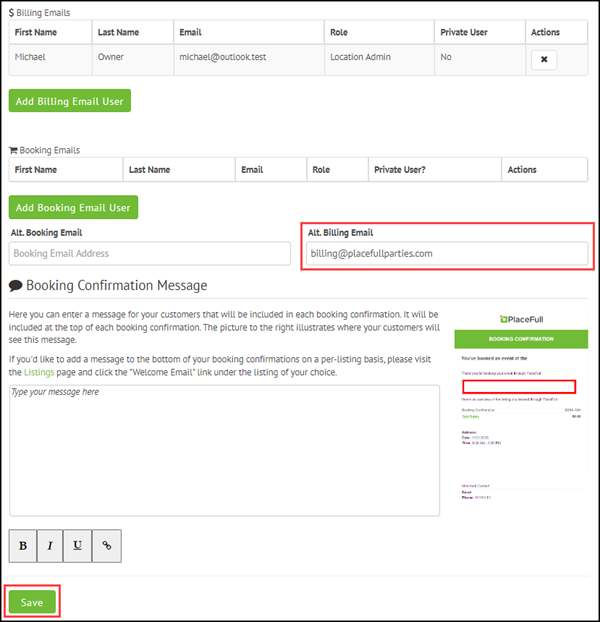
Type the email address in the Alt. Billing Email
field.
|
|
b.
|
Scroll to the bottom of the page and click Save.
|

Comments
0 comments
Please sign in to leave a comment.