You can assign categories to listings or products. There are three ways to
assign categories:
-
From the listing page
-
From the product page
-
From the Categories page
Assigning categories from the listing page
|
1.
|
Click Manage and select Listings.
|
|
2.
|
On your Listings page, scroll down to the listing
and click Edit below the listing name.
|
|
3.
|
Click the Edit button to the right of the listing
name.
|
|
4.
|
Click in the Category field and select the categories
you want to assign to the listing.
|
Assigning categories from the product page
|
1.
|
Click Manage and select Products.
|
|
2.
|
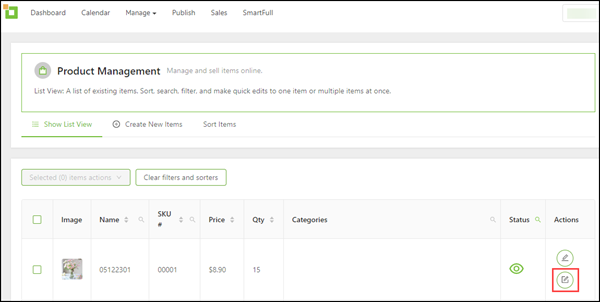
On your Product Management page, scroll down
to the product and click the Full Edit icon
in the Actions column.
|
|
3.
|
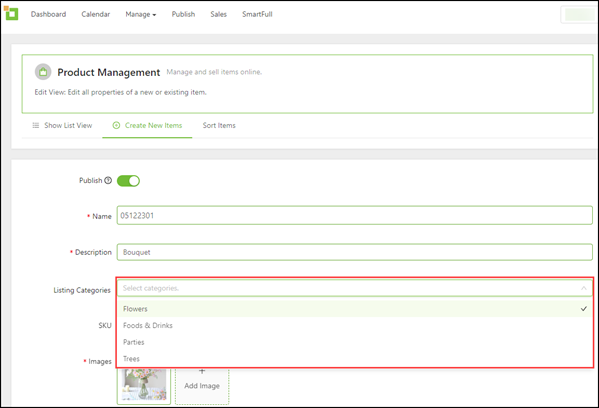
Click in the Listing Categories field and select
the categories you want to assign to the product.
|
Assigning categories from the Categories page
You can only assign categories to listings from the Categories page.
|
1.
|
Click Manage and select Categories.
|
|
2.
|
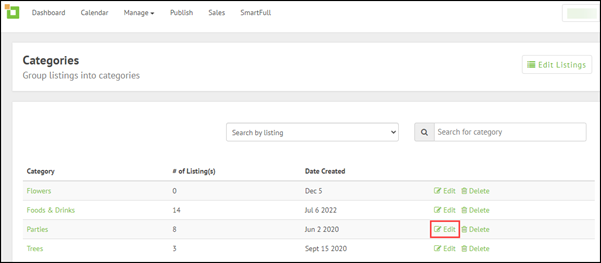
On your Categories page, scroll down to the
category and click Edit to the right of the
category name.
|
|
3.
|
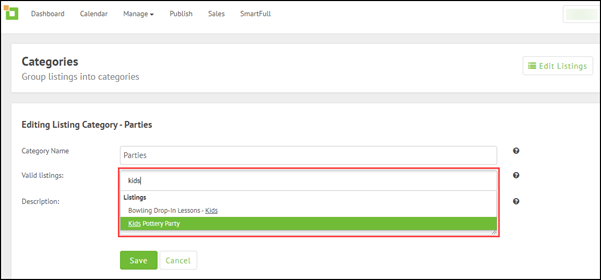
Click in the Valid Listings field and select
the listings you want to assign to the category.
|
Video tutorials

Comments
0 comments
Please sign in to leave a comment.